
Integrations
Voice-first billing that fits your current system.
CaseClock connects natively to Clio and works with any other practice management system through a structured CSV workflow.
Why stack fit matters
CaseClock improves the workflow without replacing the system
Law firms have already invested heavily in the practice management and billing systems they rely on daily. Asking a firm to replace its entire financial infrastructure to solve a time capture problem is a non-starter. The disruption outweighs the benefit.
CaseClock is built to fit the existing infrastructure. It acts as a voice-first capture and structuring layer that sits upstream of the current system of record. The value is highest when it improves the billing workflow without requiring a system replacement.
Billing is the first workflow where this stack fit matters most. By connecting to the systems firms already use, CaseClock ensures that voice-first capture translates directly into structured, review-ready entries where they belong.
Native connection — Clio
Entries sync directly to Clio after lawyer review. There are no manual export steps. Clients and matters flow from Clio into CaseClock automatically, and billing rates are applied directly from the matter.
See the Clio integration →Structured CSV workflow — all other systems
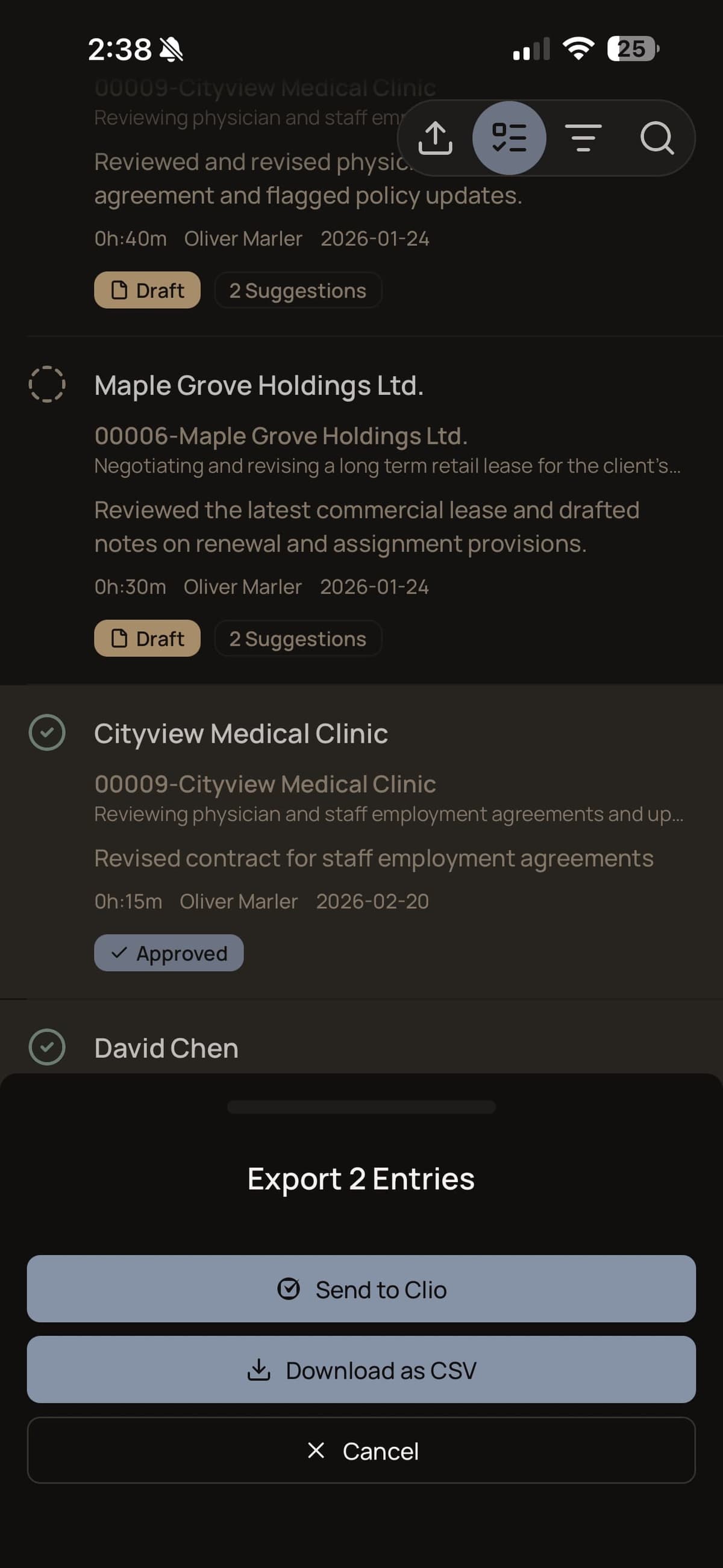
CaseClock exports structured, reviewed billing entries as CSV files that import cleanly into the billing system. No system replacement is required. The voice capture and review experience is identical regardless of which path is used.
All supported systems
Clio
Native ConnectionCaseClock connects natively to Clio. After the lawyer reviews and approves a time entry, it syncs directly to Clio — no manual export required.
MyCase
CSV WorkflowCaseClock works with MyCase through a structured export workflow. After capturing and reviewing your time entries by voice, export them as a structured CSV file and import directly into MyCase — no native connection required, no disruption to your existing workflow.
PracticePanther
CSV WorkflowCaseClock works with PracticePanther through a structured export workflow. After capturing and reviewing your time entries by voice, export them as a structured CSV file and import directly into PracticePanther — no native connection required, no disruption to your existing workflow.
Filevine
CSV WorkflowCaseClock works with Filevine through a structured export workflow. After capturing and reviewing your time entries by voice, export them as a structured CSV file and import directly into Filevine — no native connection required, no disruption to your existing workflow.
PCLaw
CSV WorkflowCaseClock works with PCLaw through a structured export workflow. After capturing and reviewing your time entries by voice, export them as a structured CSV file and import directly into PCLaw — no native connection required, no disruption to your existing workflow.
CosmoLex
CSV WorkflowCaseClock works with CosmoLex through a structured export workflow. After capturing and reviewing your time entries by voice, export them as a structured CSV file and import directly into CosmoLex — no native connection required, no disruption to your existing workflow.
Dye & Durham
CSV WorkflowCaseClock works with Dye & Durham through a structured export workflow. After capturing and reviewing your time entries by voice, export them as a structured CSV file and import directly into Dye & Durham — no native connection required, no disruption to your existing workflow.
More native integrations
Coming SoonAdditional native connections are in development. More systems will be announced.
Direct Integration
Clio — Connected in Minutes.
CaseClock integrates directly with Clio Manage. Your matters, clients, and billing rates sync automatically. Approved time entries flow into Clio without any copy-pasting or re-entry. See the Clio sync guide for a step-by-step walkthrough.
Open CaseClock and tap Settings → Integrations
Tap "Connect Clio" and sign in with your Clio credentials
Authorize CaseClock to access your matters and time entries
Start capturing time — entries sync to Clio automatically
CSV Workflow
Don’t Use Clio? No Problem.
CaseClock exports your validated time entries as a CSV file that you can import into any practice management system that accepts CSV imports.
CSV import is built directly into CaseClock. Export from your current system and upload the file in the app — the import wizard handles column mapping and formatting. Read the CSV import and export guide for step-by-step instructions. More native integrations are added regularly.
Compatible with

PCLaw
CSV workflow
CosmoLex
CSV workflow
MyCase
CSV workflow
Filevine
CSV workflow
PracticePanther
CSV workflow
Dye & Durham
CSV workflowOther system
CSV workflowCommon Questions
Integrations FAQ
Get started
Book a demo to see how CaseClock fits your stack.
We’ll walk you through the Clio connection or the CSV workflow for your current system.