
Direct API Integration
Voice-first legal billing that fits your Clio workflow
CaseClock captures billable work by voice while it is fresh, structures it into review-ready time entries, and syncs approved entries directly into Clio — no manual export required.
Why voice-first matters for Clio firms
Better capture makes Clio billing more complete
Clio firms already have their billing infrastructure in place. Matters, clients, billing rates, and time entry workflows are all established in Clio. The problem is what happens before the entry reaches Clio.
Voice-first capture upstream produces better entries. When lawyers speak their work in the moment, the entries arrive in Clio with stronger narratives and require less end-of-day reconstruction. The detail is preserved before it fades.
The native connection means there is also no friction at the export step. CaseClock connects to Clio and imports your clients and matters — including file numbers, matter descriptions, and billing rates. After you review and approve a time entry in CaseClock, it syncs directly to Clio as a time entry — with the date, matter, billing narrative, and duration already filled in. No copy-paste, no CSV, no manual entry in Clio.
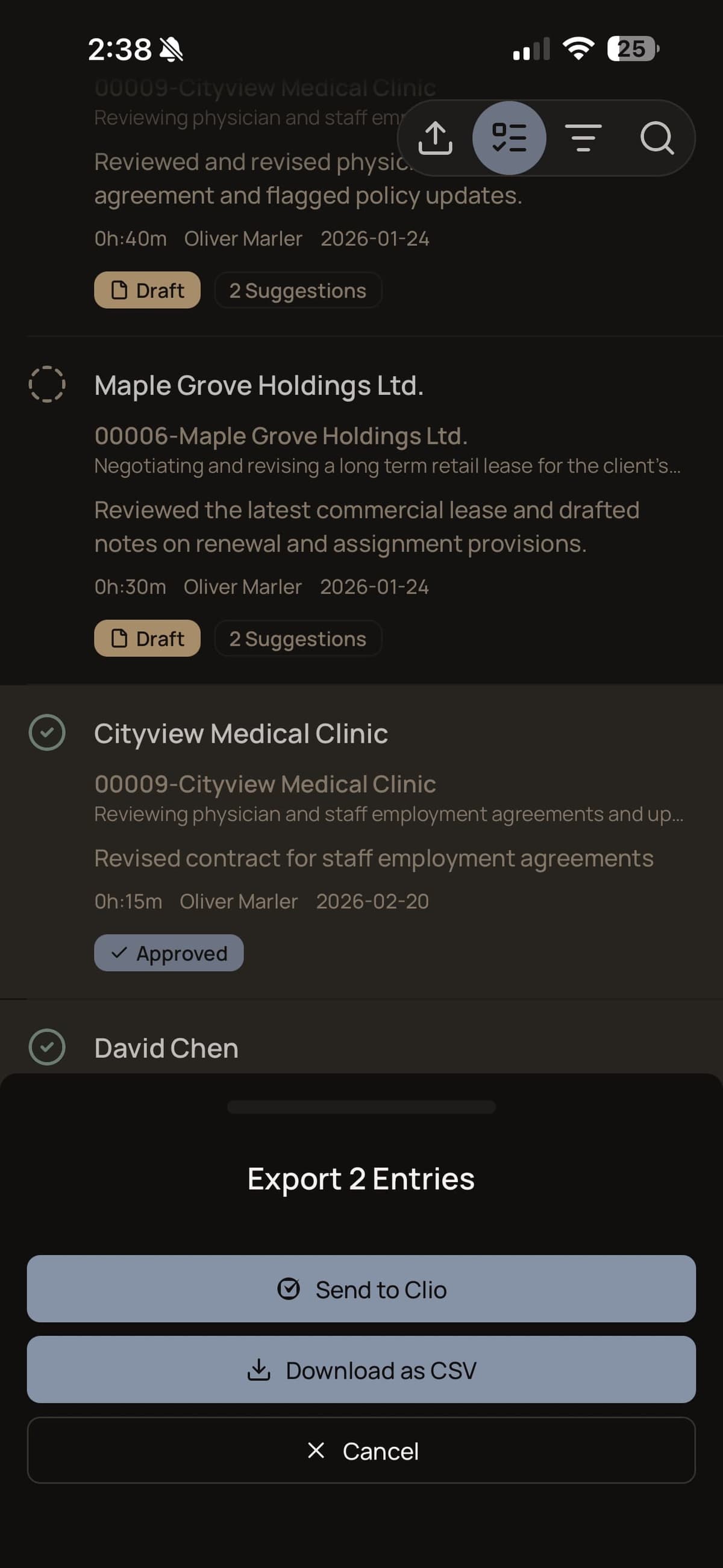
Native data flow
Context flows in. Approved entries flow out.
What CaseClock pulls from Clio
CaseClock connects to Clio and imports your clients and matters — including file numbers, matter descriptions, and billing rates. This means every time entry you capture by voice is automatically linked to the right client and matter from the moment it’s created.
- Clients — name and ID, auto-linked to every entry you capture
- Matters — file number, description, billing method, and hourly rate where applicable
- Existing time entries — for sync reference so CaseClock knows what has already exported
What syncs back to Clio after lawyer review
After you review and approve a time entry in CaseClock, it syncs directly to Clio as a time entry — with the date, matter, billing narrative, and duration already filled in. No copy-paste, no CSV, no manual entry in Clio.
- Date of the matter, call, or task
- Matter reference — linked to the correct file automatically
- Billing narrative — the structured description you approved
- Duration — captured in the moment, not reconstructed after the fact
- Hourly rate — applied directly from the matter in Clio
How it works
Connect. Dictate. Review. Sync.
Connect
Connect CaseClock to Clio via OAuth. Done once in settings — no IT involvement, no configuration required.
Sync context
Clients and matters sync automatically. Every entry you capture is linked to the right file from the moment it is created.
Dictate
Capture billable work by voice as it happens. CaseClock structures it into a review-ready entry — client and matter already matched.
Review
Review and approve the draft in CaseClock. Edit if needed. Nothing leaves the app without your explicit sign-off.
Sync
The approved entry syncs directly to Clio as a time entry — date, matter, billing narrative, and duration already filled in.
Invoice
Invoice from Clio as normal. The entry is already there, structured and accurate, ready for your billing cycle.
Step 3 is not optional. Nothing syncs to Clio until the lawyer reviews and approves the entry. Lawyer review is the trust mechanism — it is always the final step before any data moves.
Setup and fit
Fits into your existing Clio environment
CaseClock connects to Clio via OAuth. The connection is established once. CaseClock does not replace Clio’s role in the firm’s workflow.
It acts as a voice-first capture and structuring layer that sits upstream of Clio. Existing Clio workflows, billing practices, and reporting are unaffected.
Lawyers continue using Clio exactly as before for everything except the moment of capture. The system of record remains intact while the capture process becomes frictionless.
Results from users
Real outcomes from lawyers who bill by voice
A minimum of 0.5 hours of previously missed billable time captured from day one — grows with use
“From my first day I was capturing at least half an hour of billable time I had been missing every single day — and because entries get into our system the same day, we bill sooner and get paid sooner.”
“It is an easy firm-wide rollout decision.”
Clio Integration FAQ
No. CaseClock is a voice-first capture and structuring layer that sits upstream of Clio. Your existing Clio workflows, billing practices, and reporting stay exactly as they are. CaseClock improves what happens before an entry reaches Clio — it does not replace Clio's role in the firm.
After you review and approve a time entry in CaseClock, it syncs directly to Clio as a time entry — with the date, matter, billing narrative, and duration already filled in. No copy-paste, no CSV, no manual entry in Clio. The connection is established once via OAuth and runs automatically from that point.
Yes, always. Every entry CaseClock produces is a draft. You see it, edit it if needed, and approve it before it syncs to Clio. Nothing moves without your sign-off. Lawyer review is the final step before any data leaves CaseClock.
No — and this is an important distinction. Generic dictation tools turn speech into text and leave the lawyer to format a billing entry. Passive time-tracking tools infer activity from background monitoring. CaseClock is neither. It is a billing-native workflow: you speak the work, CaseClock produces a structured, review-ready billing entry, and you approve it before it syncs. That is a different product with a different workflow.
CaseClock connects to Clio via OAuth. In CaseClock's settings, tap Integrations, connect your Clio account, and authorize access to your matters and time entries. Setup takes minutes, not days, and does not require changes to how your firm currently uses Clio.
Yes. Firms that use other practice management systems can use CaseClock's structured CSV export workflow. After reviewing and approving entries in CaseClock, export them as a structured CSV file and import directly into your current billing system. The voice capture and review experience is identical.
Still have questions? We’re happy to help.
Start CaseClock free.
45-day free trial. No credit card. No commitment. Create a workspace and see how CaseClock fits your firm's billing workflow.
Have questions about firm onboarding? .